

A classic CMS delivers both the content and the pages. That is convenient at first, but it ties the presentation to the CMS's templates, plugins and release cycle. When the design has to change, or a page has to perform better, you end up working inside the CMS instead of with it.
Let us take a concrete example: the fictitious company Space Travel needs a new website at space-travel.example. The architecture is headless: Strapi as a CMS that only delivers content through an API, and Next.js as a separate frontend that fetches the content and builds the pages. The company and the names are made up, but the choices and lessons come from real projects, including a few mistakes that only show up when you test against a real database.
Why headless?
The main gain is the separation. Editors work in Strapi's admin panel with content structured around the domain: articles, categories, authors. Developers have full control over design, performance, accessibility and SEO in the frontend, and can develop, test and release it without touching the CMS.
The price is that you have to build yourself what a traditional CMS gives you for free: previewing drafts, a cache that refreshes on publish, and a sitemap. None of it is hard, but it belongs in the plan from the start.
The architecture: one repository, two images, one network
Frontend and backend live in the same git repository, but are built as two separate Docker images. That gives one history and one pull request for changes that cut across both, for example a new field in Strapi and the component that shows it. At the same time the two parts can be scaled, restarted and rolled back independently.
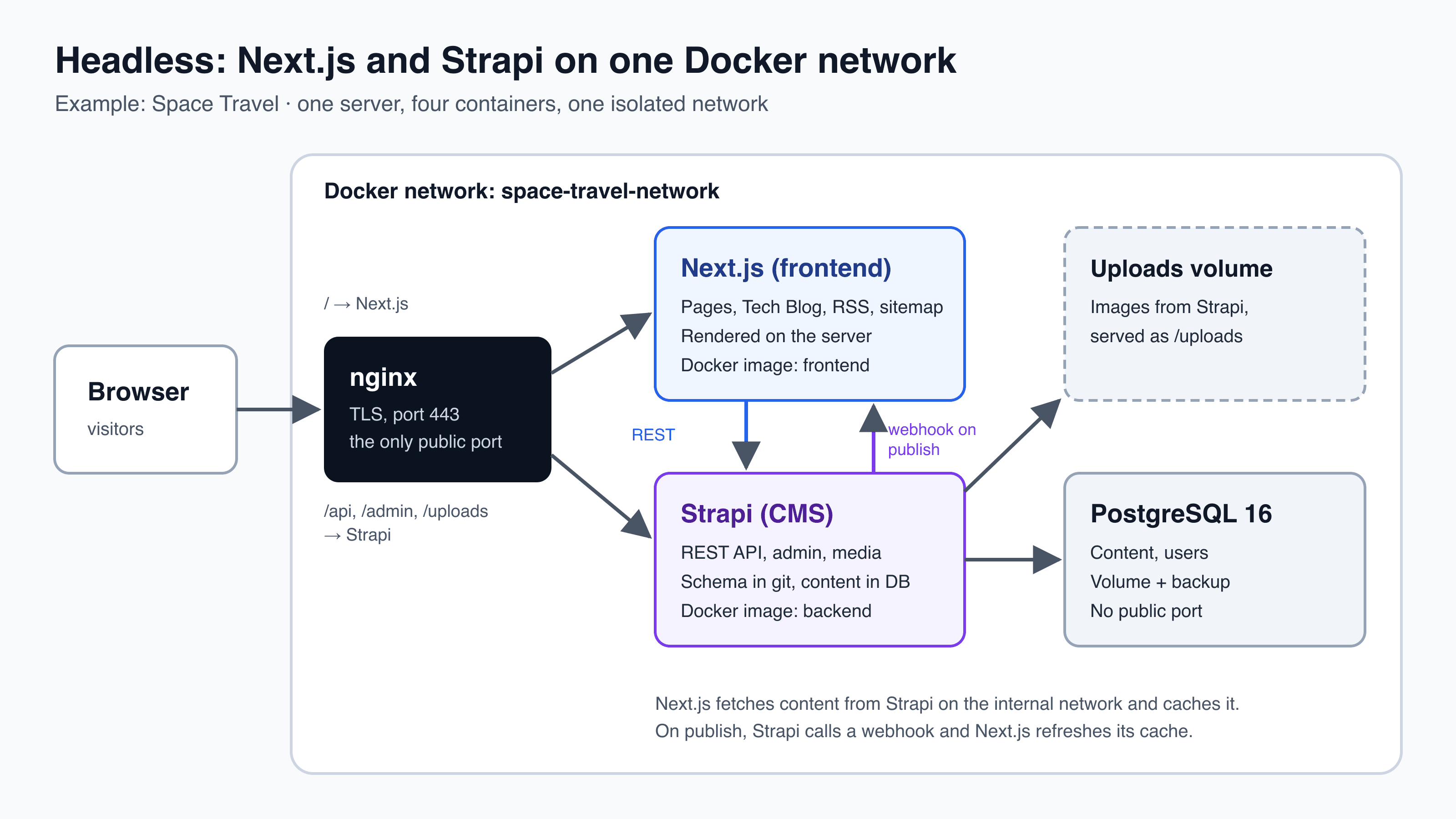
In production four containers run on an isolated Docker network, space-travel-network: nginx, Next.js, Strapi and PostgreSQL (space-travel-db). Only nginx has a public port. Next.js fetches content from Strapi on the internal network, while the browser loads images via /uploads, which nginx passes on to Strapi. The database has no outward-facing port at all.
The content model: blocks in a Dynamic Zone
An article in Strapi has fixed fields (title, slug, excerpt, category, author, tags) and a field blocks, which is a Dynamic Zone: an ordered list of components that the editor puts together. Space Travel has nine block types: Markdown text, image, gallery, code, callout, quote, video, call to action and key points.
In the frontend every block has a field __component, for example blog.code. A small registry decides which React component renders which block. Unknown blocks are skipped, so a new block type in Strapi does not break the page before the frontend is ready for it:
// __component -> component. New block types are registered here.
const REGISTRY = {
  "blog.rich-text": RichText,
  "blog.image": ImageBlock,
  "blog.gallery": Gallery,
  "blog.code": CodeBlock,
  "blog.callout": Callout,
  "blog.quote": Quote,
  "blog.video": VideoEmbed,
  "blog.cta": CallToAction,
  "blog.key-points": KeyPoints,
};

export function BlockRenderer({ blocks, locale }: { blocks: Block[]; locale: Locale }) {
  return (
    <>
      {blocks.map((block, index) => {
        const Component = REGISTRY[block.__component];
        if (!Component) return null; // unknown blocks are skipped
        return <Component key={index} block={block} locale={locale} />;
      })}
    </>
  );
}
The first surprise came from Strapi's API. Relations, images and components in a Dynamic Zone are not included in the response unless you ask for them with populate. With Strapi 5's on syntax you list each block type separately. An integration test that uploads real images and sends exactly the query the frontend uses shows two things that are easy to miss in the documentation:
- a block type that is not in the
onlist does not just come back empty. It disappears from the response entirely; [on][blog.gallery]=truereturns the block, but without the images. Images and nested components have to be named explicitly.
export const ARTICLE_POPULATE: Readonly<Record<string, string>> = {
  "populate[cover]": "true",
  "populate[category]": "true",
  "populate[tags]": "true",
  "populate[author][populate][avatar]": "true",
  "populate[seo]": "true",
  "populate[blocks][on][blog.rich-text]": "true",
  "populate[blocks][on][blog.image][populate][image]": "true",
  "populate[blocks][on][blog.gallery][populate][images]": "true",
  "populate[blocks][on][blog.code]": "true",
  "populate[blocks][on][blog.callout]": "true",
  "populate[blocks][on][blog.quote]": "true",
  "populate[blocks][on][blog.video]": "true",
  "populate[blocks][on][blog.cta]": "true",
  "populate[blocks][on][blog.key-points][populate][points]": "true",
};
That is why the query lives in one place in the frontend, and the backend test uses the same list. If you add a block type in one place and forget the other, the test fails.
Cache, publishing and preview
Next.js caches the responses from Strapi, so a page does not have to fetch everything again on every visit. That raises the classic question: how does the reader see a correction right away? The answer is a webhook. When an editor publishes or changes something, Strapi calls an internal route in Next.js with a secret key, and Next.js drops exactly that part of the cache. Let Strapi create the webhook automatically at startup if it is missing, so it does not depend on a manual step after every installation.
Previewing drafts uses Next.js draft mode: a link with a secret key sets a cookie, and then the pages fetch drafts from Strapi with a read-only API token. Here is a security bug that is easy to miss: Strapi 5 returns drafts to anyone with read access who adds ?status=draft to an API request. Unpublished pages can therefore be read publicly. First write a test that shows the bug, then add a small middleware that removes the parameter unless the request uses an API token.
Schema in git, content in the database
One rule has made most other things easier: the schema lives in git, the content lives in the database. Strapi's content types are JSON files in the repository and become part of the backend image. When Strapi starts, it compares the files with the database and creates the tables and columns that are missing. So the schema only changes in the development environment, never in production.
That has two consequences that belong directly in the release process:
- Additions are safe, for example a new content type or a new optional field.
- Renames and deletions are dangerous. Strapi sees a rename as "delete the old field, create a new one" and drops the column with its data. Changes like that need a migration and a database backup right before the release.
Releases through a private Docker registry
Images are built with explicit version numbers, for example registry.space-travel.example/website/frontend:v0.3.0, and pushed to a private Docker registry. The server pulls the versions listed in its .env file. Never use latest: then it is always unambiguous what is running, and a rollback means setting the previous version and starting again. If the release changed the schema, the backup taken before the release has to be restored.
Tests that match the architecture
The split into frontend and backend is reflected in the tests. Unit tests in both parts run without any services, with Strapi, fetch and the database replaced by stubs. Integration tests start the real Strapi against a separate PostgreSQL test database, which is never the development or production database. Finally, an end-to-end test runs the whole chain locally: Strapi, the built frontend and a webhook that has to make a changed title appear on the page within a few seconds.
Key takeaways
- Separate content and presentation: Strapi delivers structured content, Next.js owns design, performance and SEO.
- Build articles from blocks in a Dynamic Zone, and let the frontend pick the component from __component.
- Test the API queries against a real Strapi: populate does not always behave the way you think.
- A frontend cache needs a webhook on publish and a secure preview of drafts.
- Schema in git, content in the database, and a backup before every release that changes the schema.
Considering a headless solution?
We are happy to help you assess whether headless fits your content and team, and with the architecture if it does. Let us have an informal chat.
- nextjs
- strapi
- headless
- arkitektur